 AI Web Marketing Tools
Google Business Profile optimizer for roofers: be the contractor homeowners find after a storm
The Google Business Profile optimizer for roofers sets roofing categories and services, real service towns and a local identity, then prepares project photos and posts that show permanence. Every part is ready to paste, and inspection requests from the map are tracked after every storm.
Write your Google Business Profile
After a storm passes, homeowners step outside, see damaged shingles and search the map for a roofer they can trust. The contractors shown in that map box receive a flood of calls within hours, while the rest wait for whatever spills over. Whether your company appears depends on its Google Business Profile, its reviews and how clearly it shows that it is a real, established local business. Roofing profiles carry an extra burden, because homeowners are wary of contractors who appear with a storm and vanish before the warranty matters. A profile that answers that worry with certifications, real projects and a long review history wins both the ranking and the call. Below, each part of a roofing profile is broken down, along with the work the AI Google Business Profile Optimizer does on it.
Categories and services for a roofing contractor
The primary category for most roofing companies should be Roofing contractor, which places the profile in the searches homeowners make after damage or before a replacement. Secondary categories can cover related work such as gutter installation, siding or skylight installation, but only where the company really does that work. A general contractor category as the primary choice often pushes a roofer out of the roofing searches that matter most. Categories are chosen by studying the roofers who already lead your map, and every suggestion arrives with its reason. It never advises adding keywords to the business name, which can lead to suspension. Accurate categories put your company in front of the homeowners who need a roof, not a renovation.
Services describe the specific jobs homeowners search for after they know the category. Roof repair, full replacement, storm damage inspection, insurance claim assistance, metal roofing and flat roof work can each be listed with a short plain description. The description itself can state your years in business, your licence, your insurance and the manufacturer certifications you hold. Those facts answer the trust question directly, which matters more in roofing than in most trades. Because Google rejects links and sales language in a description, the draft stays plain, factual and short enough to fit. Every claim comes from facts you confirm, so the profile never overstates what the company offers.
Service towns and a real local identity
Roofers usually work at customers' homes, so many choose a service area profile that lists the towns they cover rather than a street address. Listing the real towns where your crews work helps the profile appear for searches there, while distance from your base still shapes ranking. Some roofers prefer to show their office address, because a visible local base reassures homeowners who fear passing contractors. Either approach can work, provided it is truthful and consistent with your other listings. The tool explains the choice and prepares the details for whichever arrangement suits your business. A clear, honest local identity is one of the strongest answers to the storm chaser concern.
Hours and contact details complete the practical picture. Many roofers take inspection calls in the evening or at weekends after a storm, and the profile should reflect that if it is true. A phone number that reaches a real person during storm season prevents the lost calls that follow severe weather. A booking link for inspections lets homeowners request a visit without waiting on hold. Every detail is drafted from facts you have confirmed, so it can be pasted straight into the profile. Practical details that work under pressure turn a storm search into a scheduled inspection.
Project photos and posts that show permanence
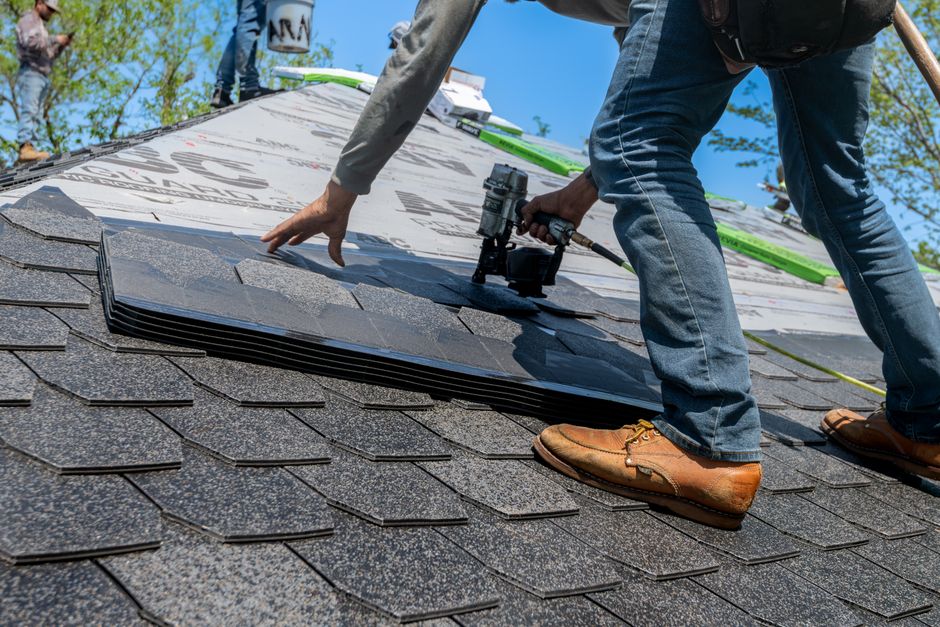
Photos are one of the most persuasive parts of a roofing profile, because a roof is a visible result. The tool prepares a photo list including completed roofs, crews at work with safety gear, close views of materials and your branded trucks. Before and after photos of storm repairs show homeowners exactly what you can do. Photos spread across several years also show that the company has been working locally for a long time. New photos added each month keep the profile active and give Google fresh evidence of real work. A gallery of real local projects reassures homeowners more than any claim in a description.
Weekly posts keep the profile active between storms and timely during them. The tool plans posts such as pre storm roof checks, what to do after hail, how insurance inspections work and seasonal maintenance tips. After a significant storm, a post explaining how to book an inspection can bring calls quickly. Each post carries a clear action, such as request an inspection or call the office. You approve every post before it appears, which keeps the tone professional and accurate. Posts that help homeowners rather than pressure them build trust that lasts beyond a single storm.
The roofing profile at a glance
Each part of a roofing profile contributes to ranking and to the homeowner's decision to call. In the table that follows, each part sits beside the work done on it and what it tells a homeowner. Once the profile is complete, keeping it current usually takes a few minutes a week, with more attention around storm season. Paid lead programmes are separate from the profile and the tool keeps them apart. A strong profile comes first, since every paid channel depends on the trust it builds. With each part in place, the profile works hardest at the moments demand peaks.
| Part of the roofing profile | What the tool prepares | What it signals to homeowners |
|---|---|---|
| Categories | Roofing contractor plus related work you do | You are a roofer, not a general builder |
| Services | Repair, replacement, inspections and claims help | You handle the problem they have today |
| Description | Years in business, licence, insurance and certifications | You are established and accountable |
| Service towns or address | An honest local identity | You will still be here when the warranty matters |
| Photos | Real local projects across several years | Your work is real and lasting |
| Weekly posts | Storm advice and inspection reminders | You help before you sell |
Reviews and matching maps after the storm
Reviews are central to a roofing profile, and their age matters as much as their number. A long history of reviews proves the company was working before the last storm and will be working after the next. A few days after each roof is finished, the AI Review Management Tool sends the homeowner your direct review link. Reviews that mention a clear inspection, help with an insurance claim and a clean site strengthen the profile for storm searches. The tool drafts calm, professional replies to every review for you to approve. A steady review record is one of the hardest advantages for a temporary contractor to copy.
Apple Maps and Bing matter too, since homeowners use them and AI assistants read them before naming a roofer. Your categories, service towns and hours are also prepared for Bing Places and Apple Business Connect, so every map agrees. After a storm, when hours and availability may change, one checklist shows all three maps side by side. Consistent details prevent homeowners from doubting whether the company is still active. They also support your appearance in AI answers about trusted local roofers. Each step of this routine sits in the guide to the Google Business Profile optimizer.
Tracking inspections from the map
A roofing profile succeeds when it fills the inspection calendar, so the results are tracked in calls and bookings. Profile insights show calls, direction requests and website visits, and a tracked link shows which website visits came from the map. The monthly report places these figures beside the work done, such as new photos, storm posts or a run of reviews. Comparing storm months with quieter months shows how well the profile captures sudden demand. When the profile underperforms after a storm, the report points to the part that needs attention. Measuring this way keeps every hour spent on the profile tied to real roofs.
Get your roofing profile ready before the next storm
A first reading shows how your profile compares with the roofers leading your local map. The first reading of the AI online marketing tools that show which roofers homeowners find first on the homepage takes about a minute. It shows which contractors appear for roofing searches near you and what their profiles include. After you sign up, the AI Google Business Profile Optimizer opens with your company details ready and its first recommendations prepared. The trial covers preparing the core of your profile before you decide on Pro. Search, maps and reviews all strengthen one another, and AI marketing for roofers in one plan shows that connection across every tool. A complete profile ready before the next storm puts your company in front of homeowners when they need a roofer most.
Questions about the Google Business Profile optimizer for roofers
- Which categories should a roofing contractor use?
- Roofing contractor and related services, chosen from those the leading local roofers use.
- How does a roofer show a real local identity?
- With a genuine address or service area, consistent details and photos of local projects.
- What should a roofer post after a storm?
- Calm advice on what to check and how to book an inspection, never pressure or scare tactics.
- How are inspections from the map tracked?
- Calls and enquiries from the profile are counted, especially in the weeks after a storm.